
AI Summary
- Provides a structured breakdown of tax-related crypto data used in your calculations
- The primary use case for this report is ClearTax import and detailed accountant review
- Includes Capital Gains Summary, Derivatives Income, Other Incomes, Other Expenses, Asset Wise P&L, and Data Sources
- Structured differently from the Income Summary Report: designed for section-wise data review rather than a user-friendly overview
- Available to all users regardless of country setting
How Is This Different from the Income Summary Report?
Think of it this way: the Income Summary is for reviewing your year. The Tax Filing Data Report is for processing it.
What Data Is Included?
Capital Gains Summary
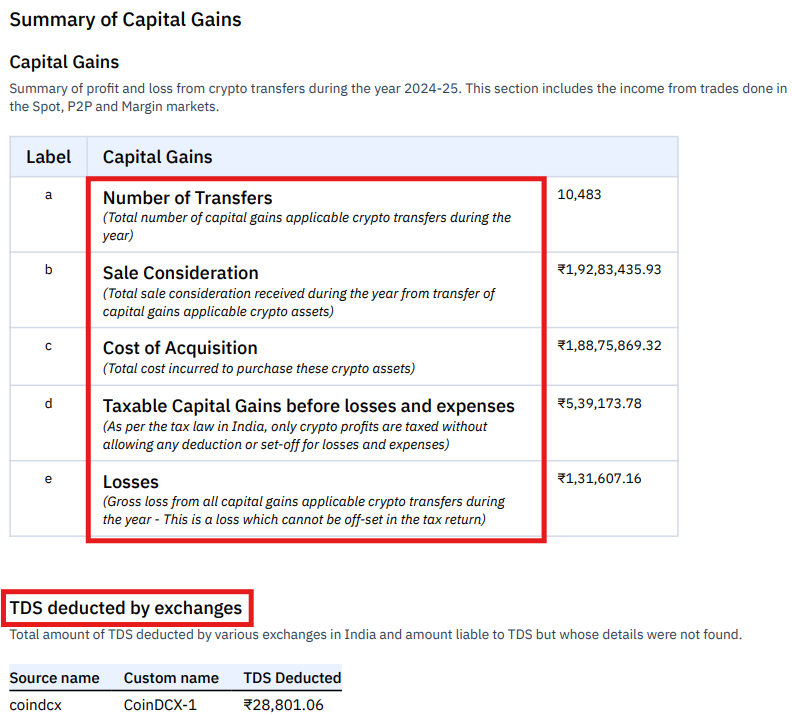
- Spot trades: Buying or selling cryptocurrency directly at market price
- Crypto-to-crypto swaps: Exchanging one cryptocurrency for another
- Margin trades: Trading crypto using borrowed funds from an exchange
- P2P transactions: Buying or selling directly with another user
- Number of transfers
- Sale consideration
- Cost of acquisition
- Taxable capital gains
- Losses
- TDS-related details (if applicable)
Income from Crypto Derivatives
Summarises realised profit or loss from futures and options trading.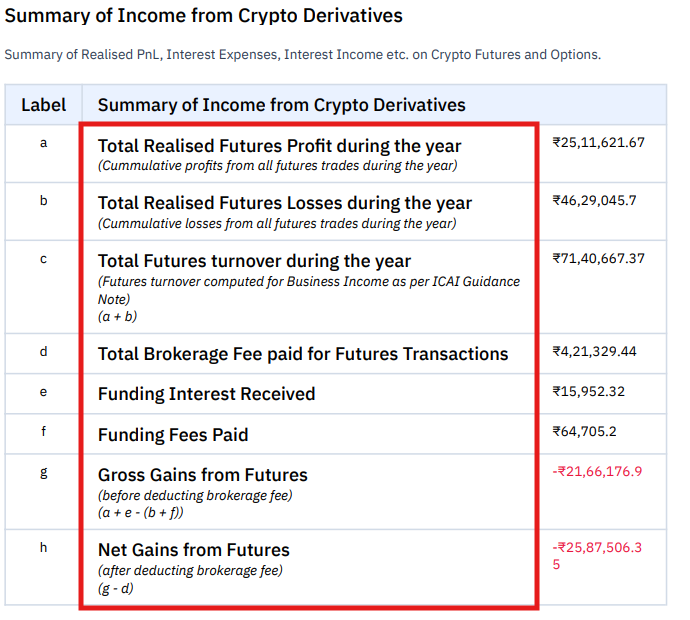
Other Incomes
Records crypto received as income rather than through trading.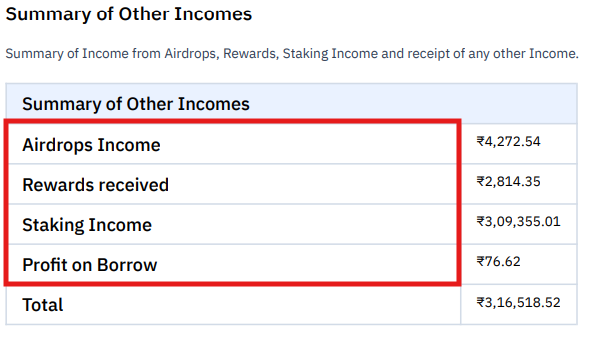
Other Expenses
Lists expenses and payments associated with crypto activities.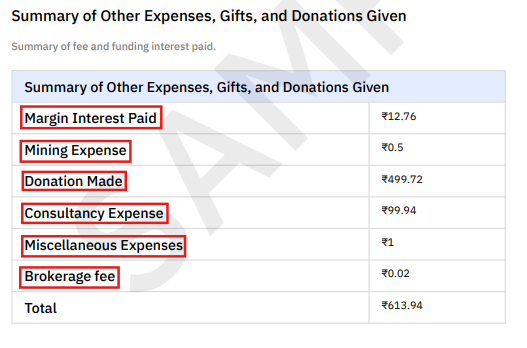
Asset Wise P&L
A coin-wise breakdown of profit and loss generated during the financial year.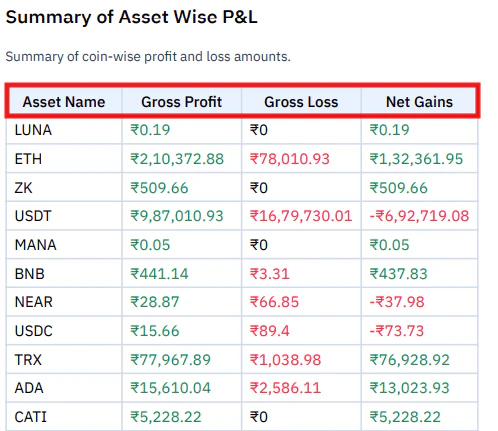
Data Sources
Lists the exchanges, wallets, or files used to generate the report, including source name, custom name, type, and address or identifier where applicable.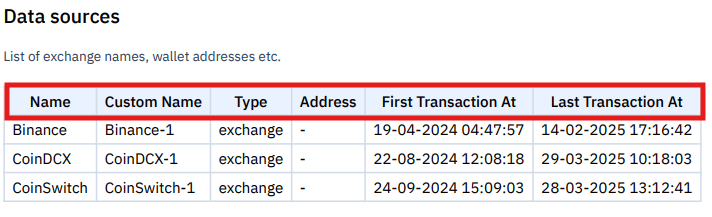
When Would You Use This Report?
- You are importing data into ClearTax for ITR filing
- Your accountant wants a detailed section-wise breakdown of gains and income categories
- You need to verify which assets generated gains or losses
- You want to confirm which exchanges or data sources were used
Frequently Asked Questions
Is this report used directly for tax filing?
Is this report used directly for tax filing?
It provides the data used in tax calculations and is specifically formatted for ClearTax import. The actual ITR filing is typically done using the Complete Tax Report or country-specific reports as the primary reference, with this report serving as the structured data input for tools like ClearTax.
Does this report include derivatives trading?
Does this report include derivatives trading?
Yes. The Income from Crypto Derivatives section provides a full breakdown of futures and options trading results, including turnover, brokerage fees, and funding payments.
Does this report show staking rewards or airdrops?
Does this report show staking rewards or airdrops?
Yes. These appear under the Other Incomes section, valued at the fair market value of the asset when received.
Can I see which assets generated profits?
Can I see which assets generated profits?
Yes. The Asset Wise P&L section provides a coin-wise breakdown of gross profit, gross loss, and net gains for each asset you traded during the year.
What is the difference between this and the Income Summary Report?
What is the difference between this and the Income Summary Report?
Both cover the same categories, but are structured differently. The Income Summary Report is designed for users who want a clear overview of their financial year. The Tax Filing Data Report is structured for accountants doing detailed review and for import into ClearTax.