
AI Summary
- This report lists every transaction across all your connected exchanges and wallets
- Includes trades, deposits, withdrawals, transfers, rewards, income events, and expenses
- This is not a tax filing document, it is a detailed record for review and audit trails
- Your CA may request this for verification alongside your tax reports
- It may contain more transactions than any single exchange because it consolidates multiple sources
- Available to all users regardless of country setting
What Does This Report Contain?
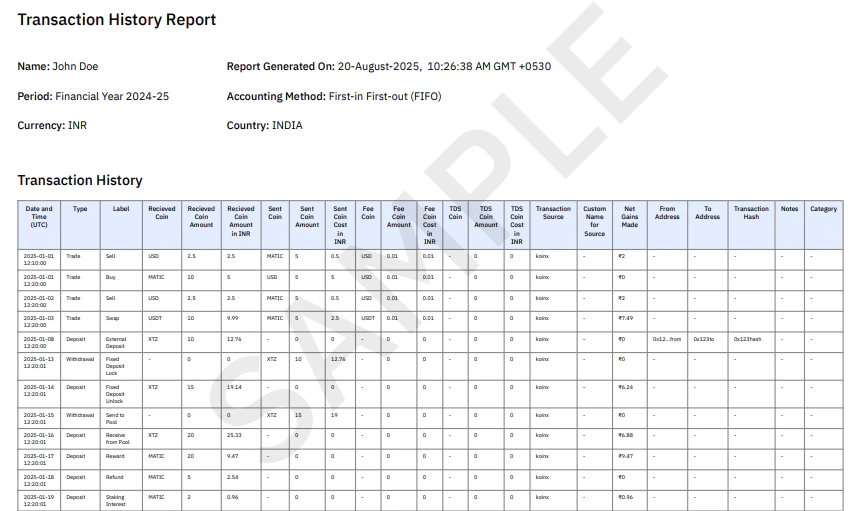
If a transaction exists in your KoinX account, it appears in this report.
Understanding Each Column
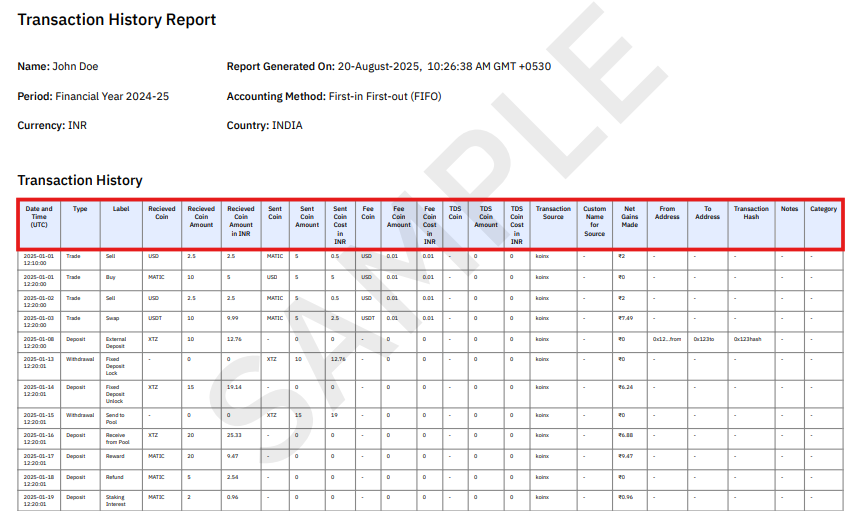
Who Needs This Report?
Your CA or accountant may request this report as a supporting audit trail. While tax reports show the final calculations, this report shows the raw transaction data behind those calculations. You, for verification: before generating your tax reports, use this to identify missing transactions, incorrect labels, duplicate entries, or unusual transaction values. Record-keeping: some users download this report annually as a complete archive of their crypto activity.How Is This Different from My Exchange Trade History?
Your exchange only shows transactions from that exchange. The Transaction History Report consolidates all connected exchanges, all connected blockchain wallets, manually uploaded transaction files, and transfers between your own wallets. This is why you will see more transactions in KoinX than in any single exchange account.Why Are Transfers Shown in This Report?
Transfers between your wallets are recorded for three reasons: cost basis tracking (following assets from acquisition to disposal), audit trails (verifying movement of funds), and reconciliation (matching withdrawals with deposits). These transfers are recorded but do not create taxable events by themselves.Using This Report Before Filing
Before generating your tax reports, run through this checklist using the Transaction History Report:- Check for warnings or missing prices
- Verify transaction labels and types are correct
- Review total transaction counts
- Check for any duplicate transactions
Frequently Asked Questions
Is the Transaction History Report the same as my exchange trade history?
Is the Transaction History Report the same as my exchange trade history?
No. Exchanges only show their own transactions. This report consolidates all exchanges, wallets, and manually added transactions into a single chronological record.
Does this report include internal transfers?
Does this report include internal transfers?
Yes. Transfers between your own wallets or exchanges are included for tracking and reconciliation purposes, though they are not taxable events by themselves.
Why are there more transactions here than on my exchange?
Why are there more transactions here than on my exchange?
Because KoinX combines multiple data sources: all connected exchanges, all connected wallets, and manually uploaded files into one unified transaction history.
Can I filter this report by date or asset?
Can I filter this report by date or asset?
The PDF version cannot be filtered directly. Download the Excel version and use spreadsheet filters to sort by date, asset, type, or source.