
AI Summary
- The Complete Tax Report is the most detailed report for Indian crypto taxpayers
- Structured to match Indian tax rules including Schedule VDA under the Income Tax Act, 1961
- Includes capital gains, derivatives income, other crypto income, TDS summary, and asset balances
- Contains transaction-level audit data your CA needs for ITR filing
- Uses your selected cost accounting method (FIFO, LIFO, HIFO or Average Cost)
- If you share just one report with your CA, this is usually the one
Report Sections Overview
1. Cover Page
Provides the basic metadata of the report: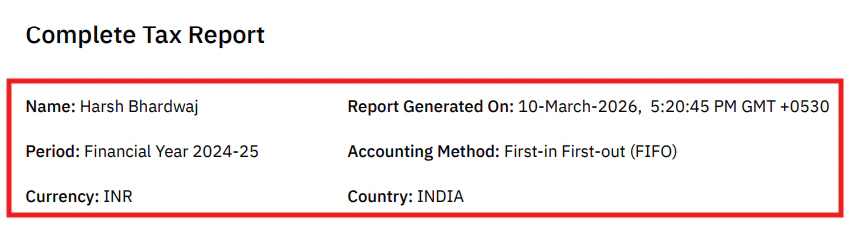
- User name
- Country (India)
- Reporting currency (INR)
- Report generation date
- Financial year covered
- Cost accounting method used
- List of sections in the report
- Disclaimer
2. Tax Settings and Customisations
Shows exactly how the report calculations were performed, based on the settings you selected in Tax Settings and Transaction Preferences. Change these settings in Customising Your Reports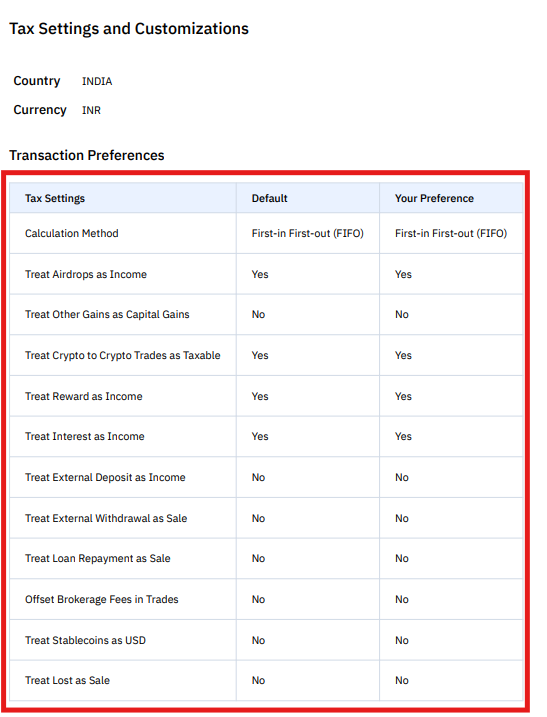
This section is useful when your CA wants to verify the calculation logic behind the report.
3. Summary of Capital Gains
Summarises all taxable crypto disposals during the financial year.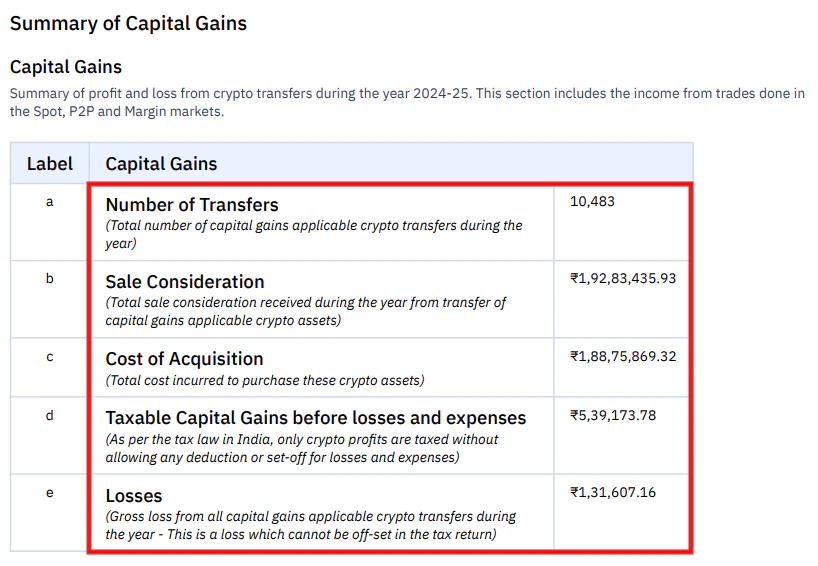
Example trades:
Tax Calculation (India)
Under Indian crypto taxation rules:- Tax Rate: 30% on gains
- Tax on Gains:
₹4,20,000 × 30% = ₹1,26,000
Health & Education Cess (4%)
₹₹5,040
Total Tax Payable
**₹**1,31,0404. Summary of Income from Crypto Derivatives
Summarises profits and losses from crypto futures and options trading. Derivatives are reported separately from spot trades because they involve different calculations such as funding fees, brokerage charges, and trading turnover.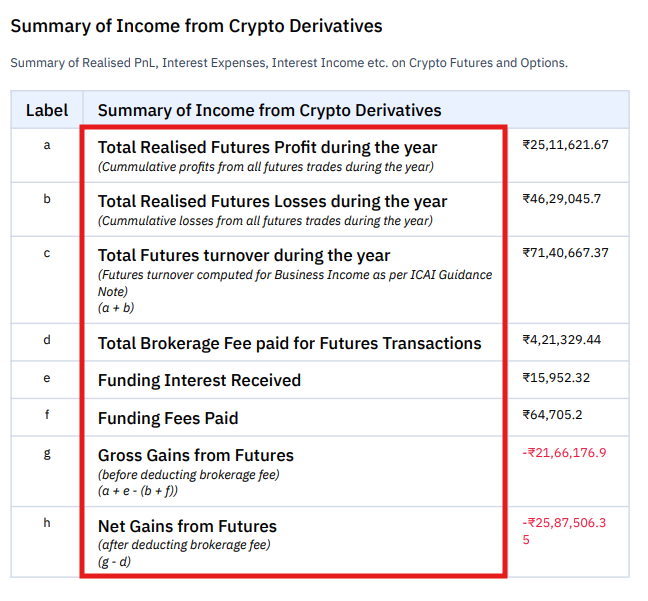
Real Example:
You traded BTC perpetual futures on an exchange:
Net Derivatives Income: ₹30,000
💡 Note: If your derivatives turnover exceeds ₹1 crore, you may need a tax audit. Consult your CA.Key terms: Futures Turnover is calculated as the sum of realised profits and realised losses from futures trading. Funding Interest applies to perpetual futures contracts, where traders either pay or receive funding fees depending on market conditions. Funding Interest Received is income; Funding Fees Paid are expenses. Gross vs Net Gains is the profit before and after deducting brokerage fees respectively.
Derivatives income may be treated as business income depending on the nature and frequency of your trading activity. Consult your CA for the correct tax treatment in your situation.
5. Summary of Other Incomes / Other Expenses
Captures crypto received as income rather than through trading. Common examples: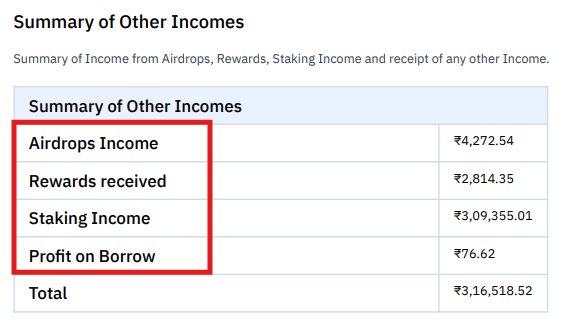
Real Example:
You staked 10 SOL for the year and received 0.8 SOL as rewards (worth ₹14,000 at time of receipt). You also received a random airdrop of 500 XYZ tokens (worth ₹2,500 at receipt).
This ₹16,500 is taxable as income. When you eventually sell those SOL rewards or XYZ tokens, you’ll also pay capital gains tax on any additional appreciation.
⚠️ Double taxation alert: You’re taxed once when you receive rewards (as income) and again when you sell (as capital gains on appreciation beyond the receipt value).
Expenses such as margin interest or operational costs also appear in this section.
6. Summary of Asset Wise P&L
Shows profit and loss per cryptocurrency asset.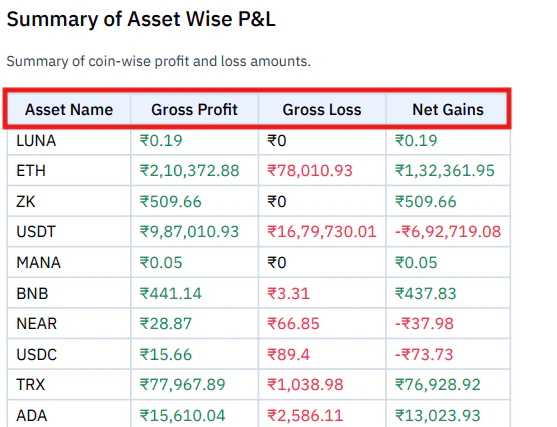
What this tells you:
- ETH was your biggest winner (+1,32,361.95)
- USDT was your biggest loser (-6,92,719.08)
7. Schedule VDA Transactions
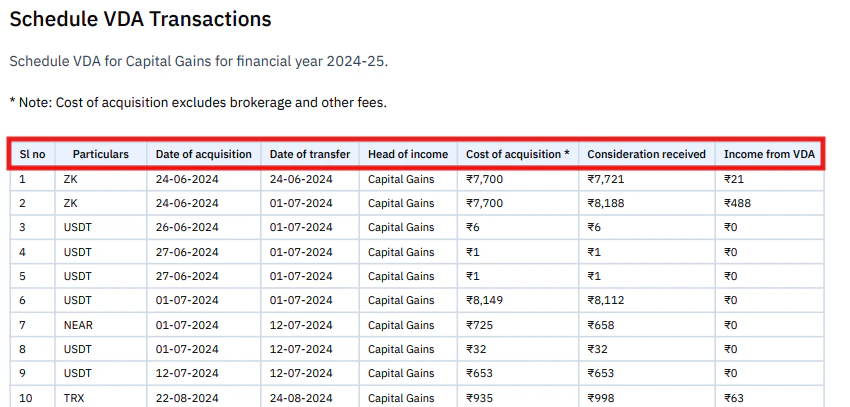
Why Income from VDA Shows Rs. 0 for Loss Trades
Under Section 115BBH, crypto losses cannot be set off against gains or any other income. Loss trades are still recorded in Schedule VDA, but Income from VDA is shown as Rs. 0. Example:- Cost of Acquisition: Rs. 50,000
- Sale Value: Rs. 32,000
- Actual Loss: Rs. 18,000
- Income from VDA reported: Rs. 0
8. Detailed Beginning of Year Balance
Shows your portfolio position at the start of the financial year, with quantity, cost in INR, value in INR, and average price per coin.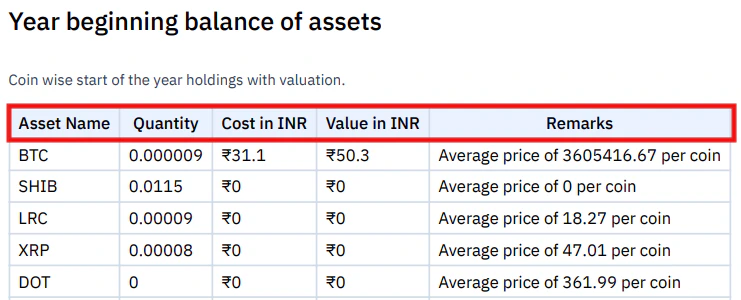
- Shows your starting position for the year
- Helps verify that cost basis carry-forward is correct
- Useful for audit trail and reconciliation
9. Detailed End of Year Balance
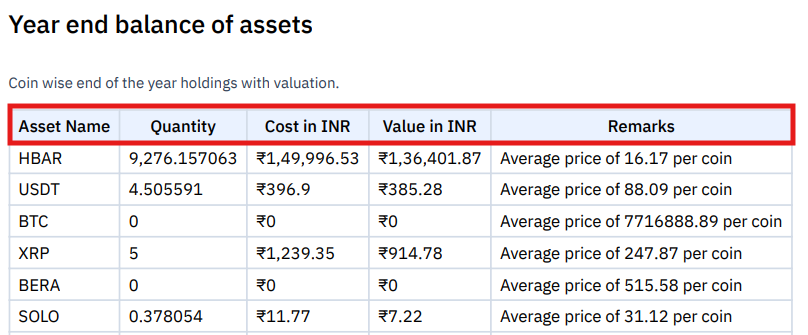
- Shows your position at the end of year.
- Help you keep a record for tax purposes.
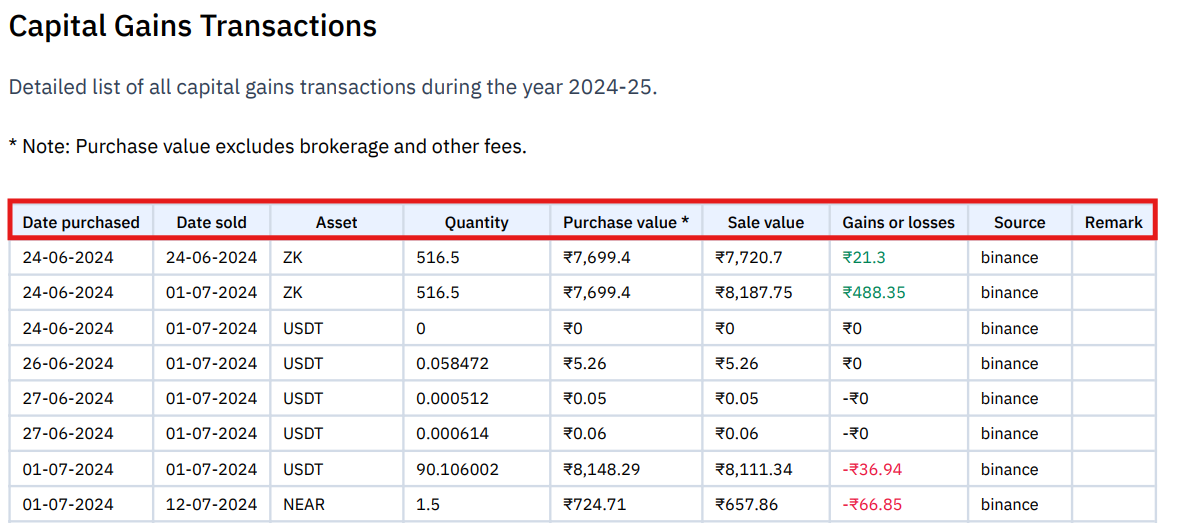
10. Capital Gains Transactions
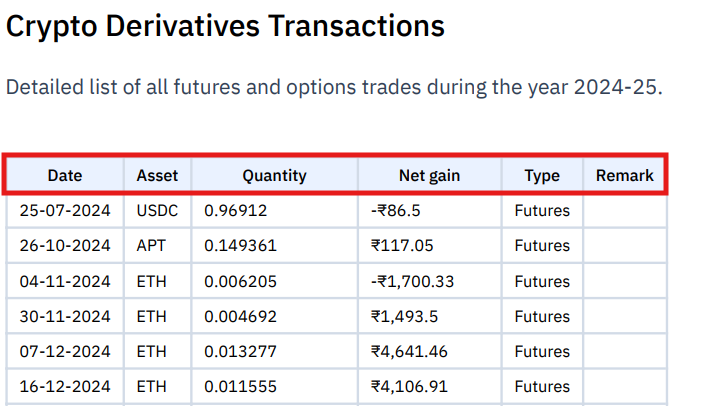
11. Crypto Derivatives Transactions
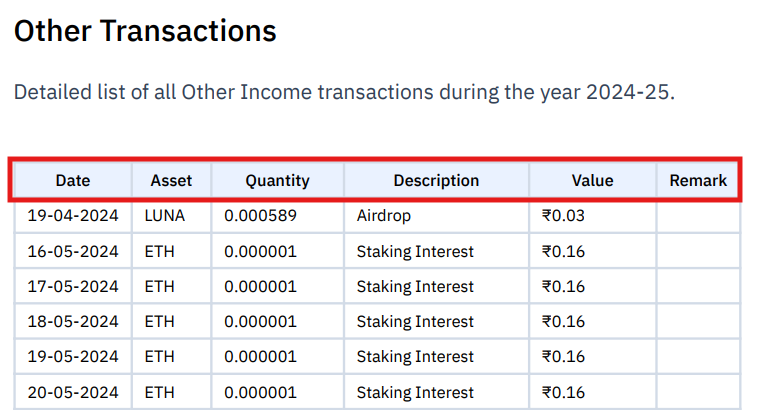
12. Other Transactions
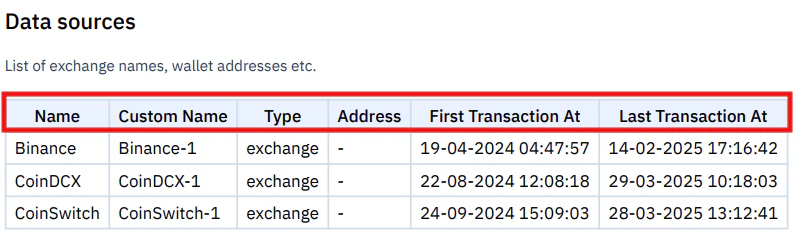
13. Data Sources
Understanding the Tax Calculation
Capital Gains (Section 115BBH)
TDS (Section 194S)
Frequently Asked Questions
Does the Complete Tax Report replace Schedule VDA?
Does the Complete Tax Report replace Schedule VDA?
No. The Complete Tax Report provides full context and detail, while the Schedule VDA Report is formatted specifically for entry into the ITR filing portal. Your CA will typically use both. The Complete Tax Report is for understanding and verification; Schedule VDA is for the actual filing fields.
Why does my report show Rs. 0 income for some trades?
Why does my report show Rs. 0 income for some trades?
Loss trades show Rs. 0 income because under Section 115BBH, crypto losses cannot offset gains or other income. The trades are still recorded in the report for audit purposes, but the Income from VDA column shows Rs. 0 for any transaction where the sale value was lower than the cost of acquisition.
Can I regenerate the report after changing settings?
Can I regenerate the report after changing settings?
Yes. Once you purchase a plan for a financial year, you can regenerate reports unlimited times at no additional cost. Edit your transactions or change a setting, then regenerate.
What does 'Changed from Default' mean in the Tax Settings section?
What does 'Changed from Default' mean in the Tax Settings section?
It means one or more Tax Settings were modified from the default configuration. This is not an error. It simply informs your CA that custom settings were applied when generating the report.
Should I classify gains as Capital Gains or Business Income?
Should I classify gains as Capital Gains or Business Income?
Both are taxed at 30% under current Indian VDA rules. The difference is how it appears in your ITR: Capital Gains goes under Schedule VDA, while Business Income can be entered under ITR 3. This is a classification decision based on your trading activity and how you intend to file. Consult your CA before changing this setting.
See all available reports including universal reports